


iPhone / iPad help archive
CnX Player for iPhone and iPad
iPhone and iPad support
For questions about an older installed version, email support@cnxplayer.com.
Using a PC? Get CnX Player for Windows from Microsoft Store.
Help for older installed versions
These instructions describe older installed versions of CnX Player. Menus and features may differ in a future release.
Audio/Video Information
Audio codecs
Older installed versions. The app is currently unavailable. Release updates.
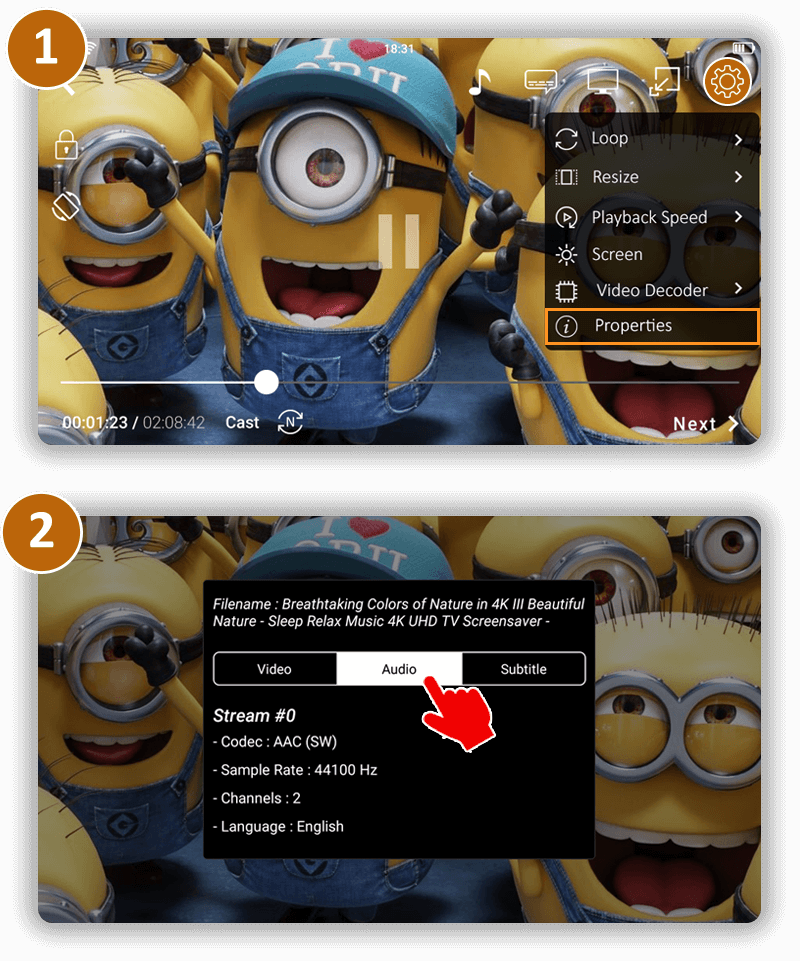
How to find out audio codec information of the video being played ?
To check the audio codec information of a video, follow the following steps:
- Click on Video Option button on full screen video playback.
- Select Media Information from there.
- Under the Audio section there is codec information available.
CnX player supports all the popular Audio Codecs listed below:
- AC3
- AAC-LC
- HE-AACv1
- HE-AACv2
- MP3
- MP2
- MP1
- Ogg Vorbis.
If there is an issue in audio of the video file then please share the video file at support@cnxplayer.com for advanced findings
Video Codecs supported
Older installed versions. The app is currently unavailable. Release updates.
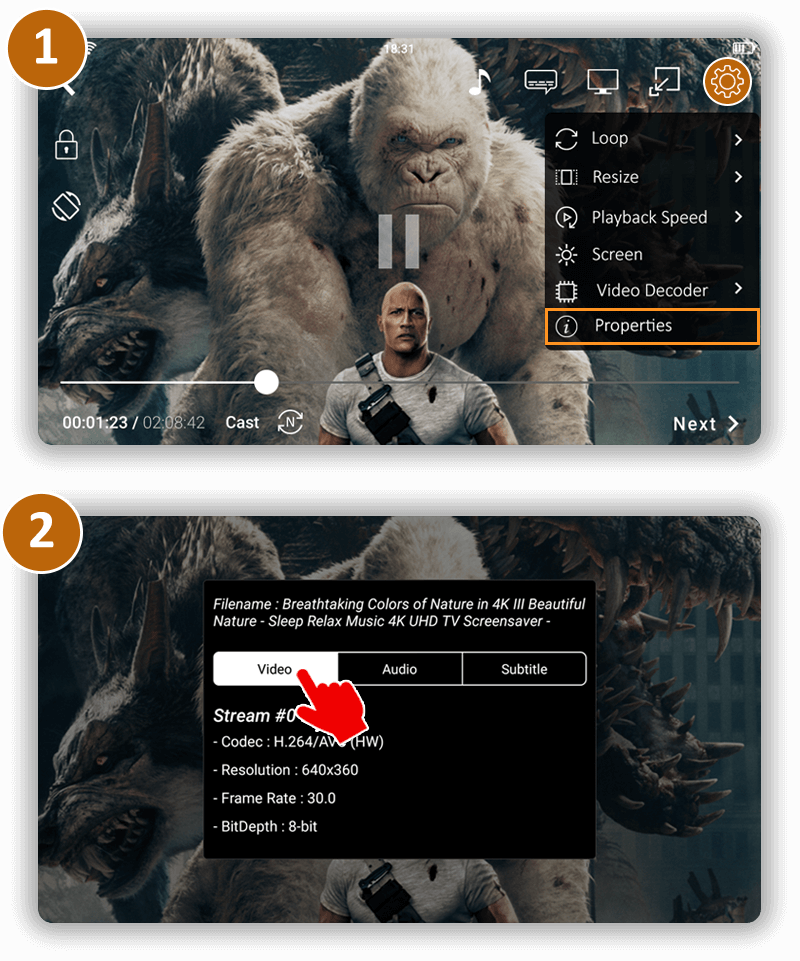
How to find video codec information of the video being played?
To check the video codec information of a video, follow the following steps:
- Click on Video Option button on full screen video playback.
- Select Media Information from there.
- Under the Video section there is codec information available.
CnX Player has highly optimized implementation of next generation hardware and software video codecs. Video codecs are highly responsible for giving the best visual experience. CnX Player's codecs implementation uses hardware acceleration, which makes it consume very less battery. By default hardware video codec is used to play video. However there is an option to change hardware codec to software codec through the Video decoder option under Video Option.
CnX Player supports following video codecs:
- H.265 or HEVC
- H.265 or HEVC 10-bit
- H.264 or AVC
- H.264 or AVC 10-bit
- Google VP9
- Google VP9 10-bit
- MPEG-4
- MPEG-2
- VP8
- VC-1 or WMV
- H.263
If there is an issue being faced while playing the video, please share the video file at support@cnxplayer.com
Video formats supported
Older installed versions. The app is currently unavailable. Release updates.
Which all video formats does CnX Player plays ?
With so much different file formats available today, it becomes really important to have a media player on your phone or tablet that can play them all seamlessly. You would of course want to avoid hours of wasted time converting and transcoding files. CnX Player plays all video formats (MKV, Webm, MP4, XVID, AVI, TS, WMV, ASF and many more) with best visual experience without any conversion. You throw any video file, we'll play it for you with buttery smooth experience!
Playing screen video options
Child (Screen) lock
Older installed versions. The app is currently unavailable. Release updates.
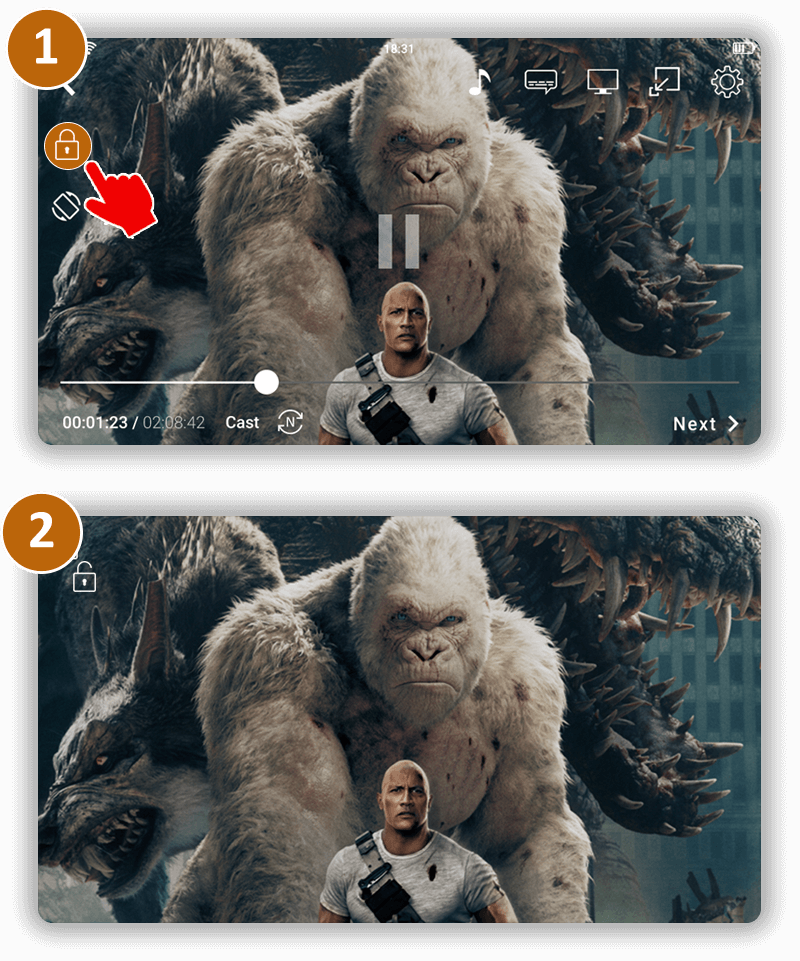
Is it possible to disable/lock touch screen while watching video ?
Yes it is possible in CnX Player to lock the touch screen when the video is being played. Click on the lock icon to lock/unlock the screen.
This feature gives an uninterrupted viewing experience !
Personalized video view options
Older installed versions. The app is currently unavailable. Release updates.
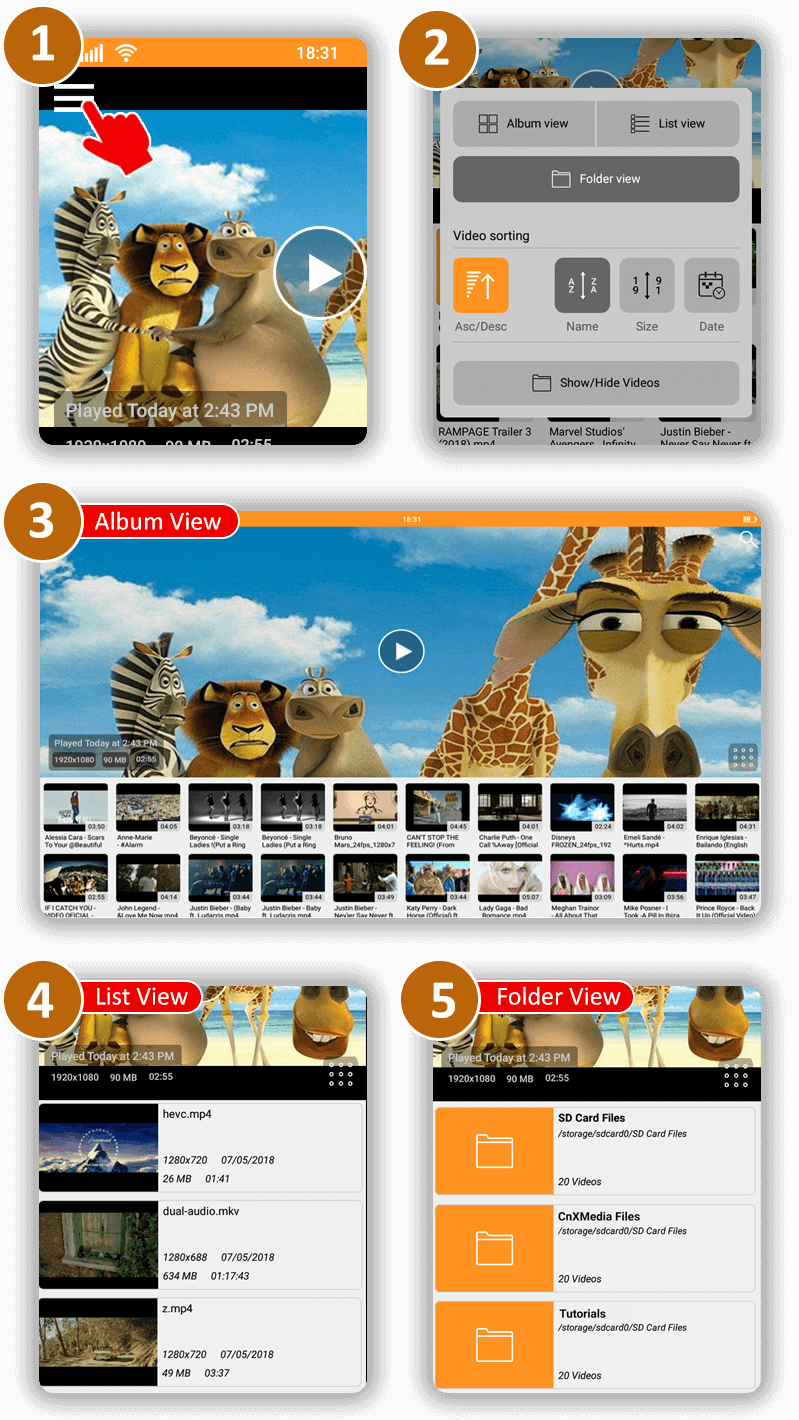
How to switch between different view options of the video gallery ?
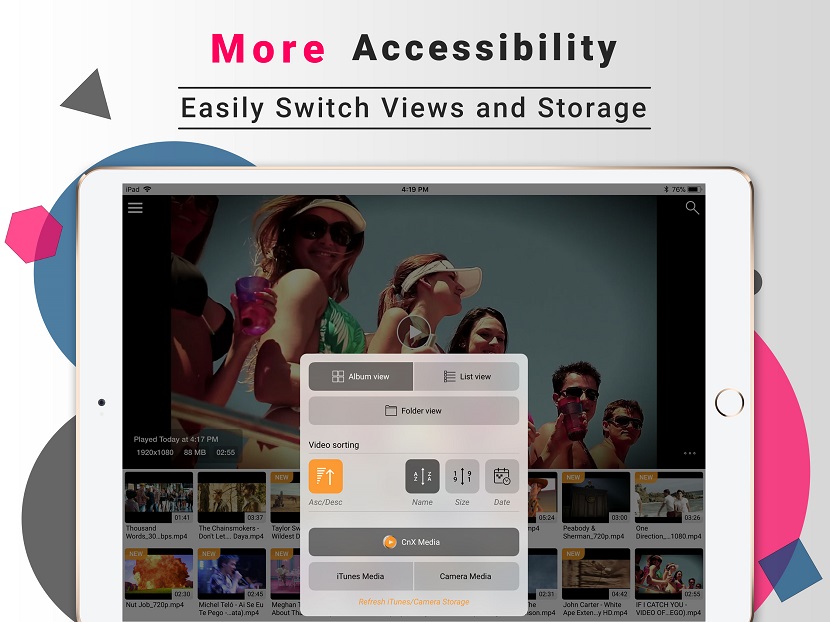
CnX Player provides a great accessibility through which you can experience your videos collection in different views.
Follow the below steps to change the view of video container representing the videos :
- To change video view click on the More option button which appears at right side of the history view.
- From the More options settings which gets appear after clicking button. Select the view which you like.
- The kind of views which we support are Album View, List View and Folder View.
- Each view has its own advantage based upon the information related to videos.
Playback speed
Older installed versions. The app is currently unavailable. Release updates.
How to change the video playback speed ?
Changing the video playback speed in CnX Player is pretty simple. Just follow the steps below:
- Tap on the settings button on video playback screen(full screen view).
- A popup will appear with various setting in it. Select Playback speed option.
- If you want slow motion of the video then choose 0.5x or 0.75x speed.
- If you want fast motion then choose 1.25x or 1.5x or 2.0x
Resize Visual Experience
Older installed versions. The app is currently unavailable. Release updates.
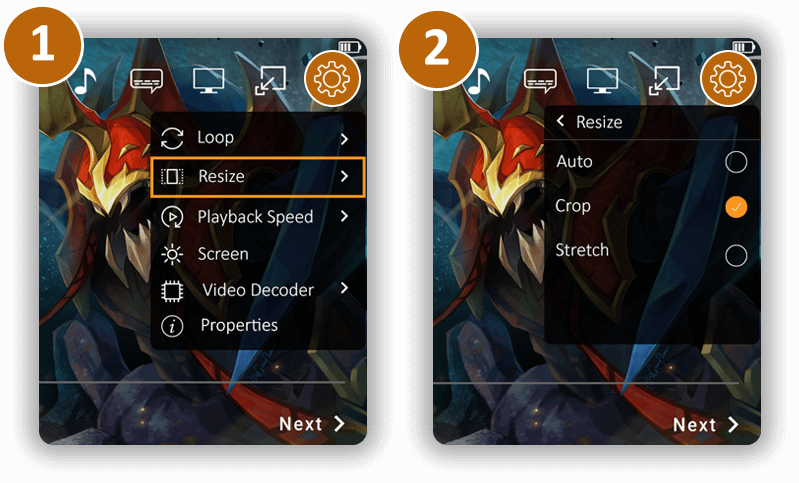
Is it possible to resize my video in CnX Player ?
Yes, videos can be resized in CnX Player.
Follow the below steps to resized video :
- Open Video options on video playback screen.
- Select Resize option.
- Auto - this is the default size of the video.
- Crop - this will crop the center of the video and zoom in.
- Stretch - this will stretch the video to full screen.
Screen settings
Older installed versions. The app is currently unavailable. Release updates.
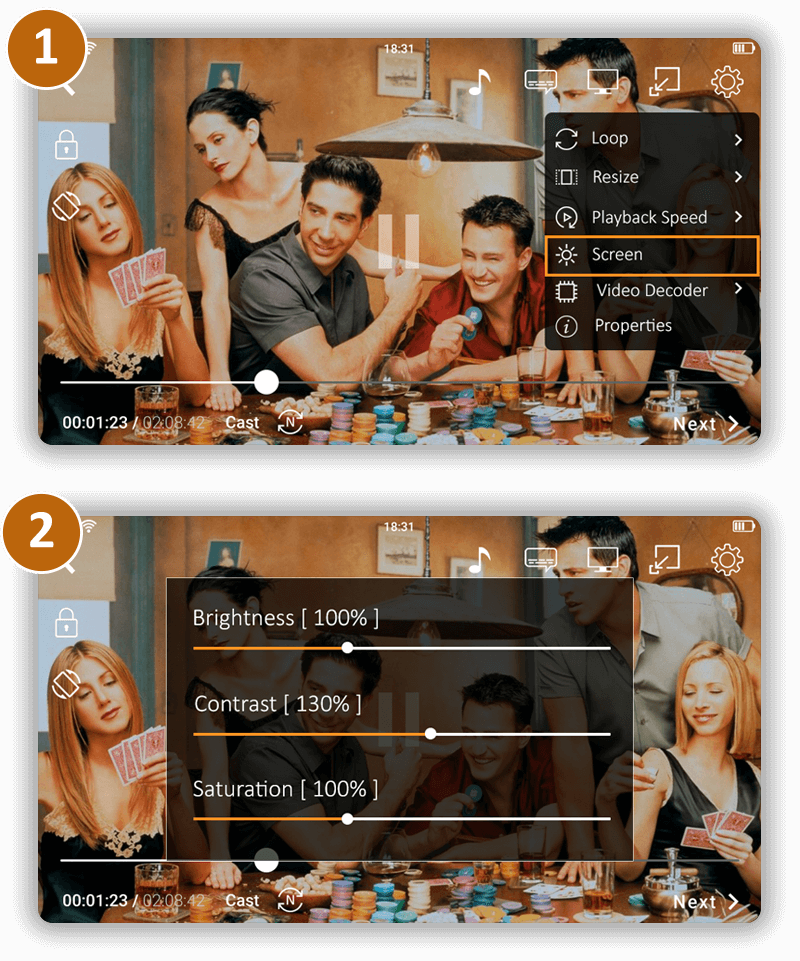
How to change screen visual settings ?
- Open Video options on video playback screen.
- Adjust Brightness, Contrast, Saturation as it suits to the eyes and experience best visuals.
Managing media files
Delete multiple media
Older installed versions. The app is currently unavailable. Release updates.
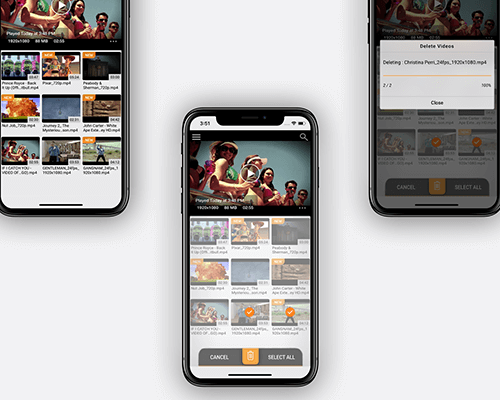
Is it possible to delete multiple files in one go ?
Yes, CnX Player provides a feature of Multiple delete through which you can manage your videos collection very easily. This functionality works from the application and also from the Wifi Management tool.
Delete media via app:
Follow the below steps to delete multiple videos from the application :
- Long click on the video of CnX Media.
- Edit mode will get open in which each video container will contain one button for selection. Click on the video container to select file.
- You might have noticed that at bottom of your device one layout appears which contains three different options related to the mode which gets opened by long clicking.
- By clicking on the Delete Button from the bottom bar all the selected videos will get deleted. The progress related to deletion will appear for your information.
Delete media via "Wi-Fi Management"
- Open Navigation bar from the toggle button at top left corner on the main screen.
- Click on the Wi-Fi Management option.
- Popup will appear in center of the screen which contains the information about the network connected and also the addresses through which you can manage the application from the web browser. Type one of the two addresses into the url location of the web browser and press enter.
- All the videos in your iPhone/iPad which are stored in CnX Media will appear in this web browser.
- Select the videos you wish to delete. If there are multiple files selected then click on delete icon on top bar.
Media Copy from iTunes and Camera
Older installed versions. The app is currently unavailable. Release updates.
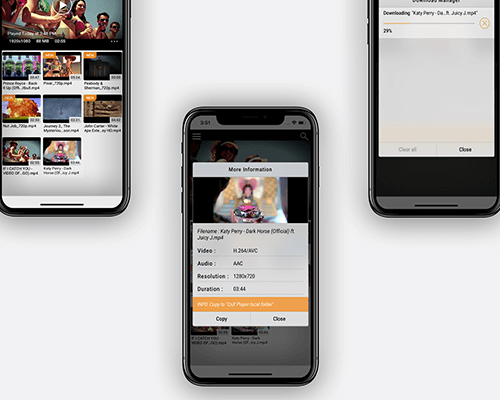
How to copy videos/media from iTunes and Camera to CnX Storage ?
Video files from iPhone/iPad internal storage like iTunes and Camera can be copied to CnX Storage from the application itself or by using Wifi-Management tool. By copying media to CnX Storage, user gets the flexibility to edit the video information like editing the name etc.
Follow the below steps to copy the media into the CnX Media :
- By long clicking on the video container in iTunes Media and Camera Media, one popup will appear which will contain information about the file selected.
- At the bottom of the popup Copy button will be present, by clicking on that button copying process will start. If the video is already present in the CnX Media error message will appear.
- In case of copying process, download manager will appear and will show the progress of the file copying. You can stop the process in between by clicking on the cross button relative to the file which you want to cancel.
- You can also close the download manager in between if you want to perform some other operation in application by clicking on close button of the download manager popup. REMEMBER: By closing the download manager popup process of copying will not get stopped, it will work in background.
- You can also view the background copying process by opening download manager from the Navigation bar.
Media Storage
Older installed versions. The app is currently unavailable. Release updates.
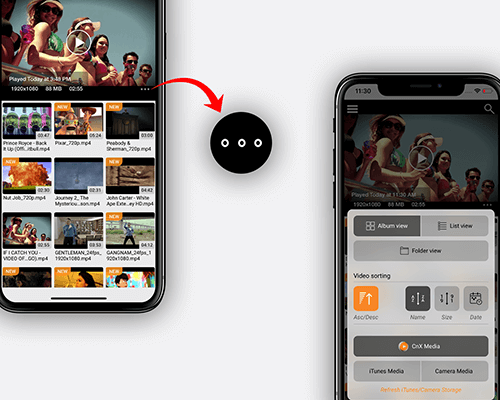
What all media can be viewed in CnX Player ?
Another awesome feature that CnX Player offers its iPhone/iPad users is accessing any video file in the device or in the same wifi network with a much simplicity.
CnX Player has 3 different storage:
- iTunes Media storage - This will show all the videos in your iTunes gallery.
- Camera Media storage - This view has all the videos that are recorded using your device camera.
- CnX Media storage -This is the storage where you can copy all kind of videos (which might not be supported by native player) and play and edit them in CnX player. You can add or copy videos to this storage via multiple options available in the app.
The best thing for iPhone/iPad users is that using CnX Player they can view videos from iTunes, camera storage and CnX media storage(other videos) in one app only. User does not need to switch app to enjoy different videos. CnX Player makes it hassle free for its user. You just need to switch the storage views within the app and that's pretty simple.
Follow the below steps to change the video storage :
- To change storage click on the More option button which appears at right side of the history view.
- From the More options settings which gets appear after clicking button. Select the storage which you like to display.
- The storage which we support are CnX Media, iTunes Media and Camera Media
Add Media
Add media via Browser
Older installed versions. The app is currently unavailable. Release updates.
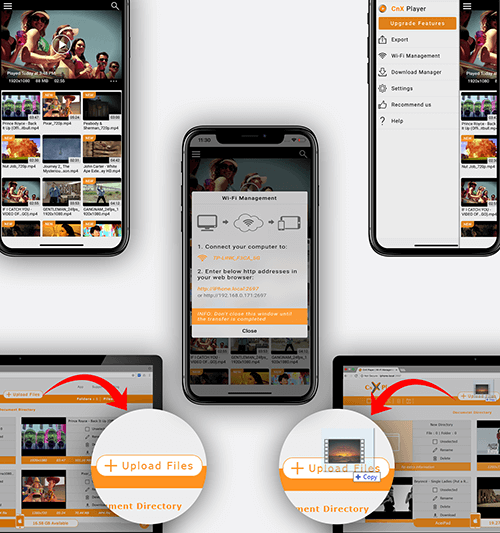
How to transfer media without wires between PC and iPhone/iPad ?
CnX Media Storage can be accessible from the PC via browser when your device and PC will be connected to same wi-fi network and then you can add media to your application easily. The feature through which you can do this functionality is Wi-Fi Management.
Follow the below steps to enable wifi management :
- Open Navigation bar from the toggle button at top left corner on the main screen.
- Click on the Wi-Fi Management option.
- Popup will appear in center of the screen which contains the information about the network connected and also the addresses through which you can manage the application from the web browser. Please type one of the two addresses into the url location of the web browser and press enter.
- Click the upload button at the top bar to upload files OR you can also drag the files near upload button to start uploading.
Add media via File sharing
Older installed versions. The app is currently unavailable. Release updates.
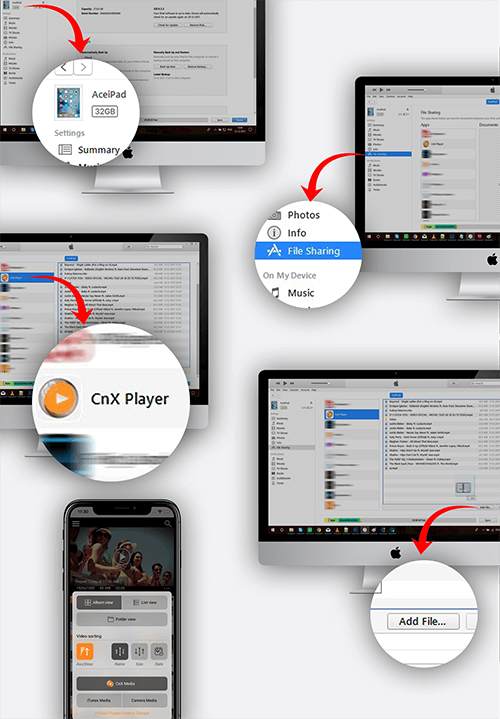
How to transfer videos from PC to iPhone/iPad using iTunes File sharing ?
CnX Player lets you play all kind of file formats which other media players or the default player can not play Or even we can say they don’t even allow to transfer some kind of file formats into there player. Using File sharing feature of iTunes you can easily transfer any kind of file format into CnX Player to play.
Follow the below steps to copy other file format videos into the application :
- Open iTunes and select the device into which you want to copy videos.
- From the left bar click on the File sharing option. All apps (those who support file sharing) will start appearing in iTunes.
- Select the "CnX Player" app from the list and start adding files into it by clicking Add button OR by just dragging the video files into the space opened.
- The videos which are copied can be viewed in the CnX Media.
- To open CnX Media in application, please visit more options settings by clicking on the More option button at right bottom side of history view. From that very opened view click on the CnX Media and all the copied videos will get appear in the application.
Add media via iTunes sync
Older installed versions. The app is currently unavailable. Release updates.
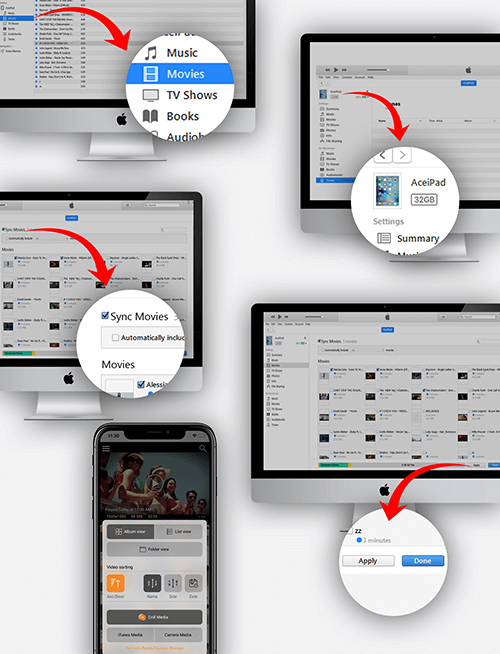
How to transfer videos from PC to iPhone/iPad using iTunes sync ?
CnX Player has the feature to play the videos which is in iTunes Storage. You can switch the video storage within the application from the more option feature. Our platform allows you to access all you media content at one place which make us different from other video players available in the market.
Follow the below steps to sync iTunes videos with your device :
- Open iTunes and ensure the videos your wish to sync are listed in the Movies (or TV Shows) section.
- Select the device you wish to sync with from the left sidebar.
- Go to Movies section inside device and select the movies which you want to synced to the device. After selection of movies click on the Apply button at the bottom of iTunes.
- synched Videos can be viewed in the iTunes Media.
- To open iTunes Media in application, please visit more options settings by clicking on the More option button at right bottom side of history view. From that very opened view click on the iTunes Media and all the synched videos will get appear in the application.
Airdrop Add media via other apps using
Older installed versions. The app is currently unavailable. Release updates.
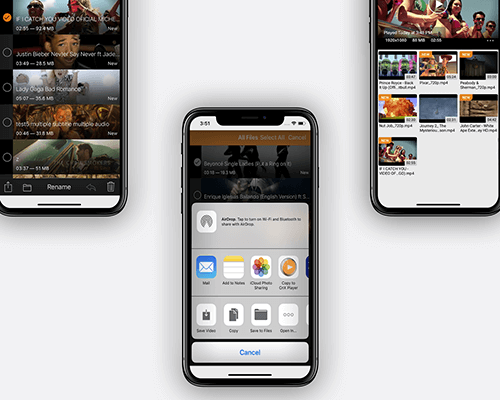
How to import media from other apps to CnX Player ?
CnX Player 2.0 supports the feature due to which now you can easily transfer the video files from other apps into CnX player.
Follow the below steps to copy video into the application from the other apps :
- Locate the video you want to copy in CnX Player and implement the action specify by that application from which you are copying video. Action could be long click or could be the button. As soon as action is implemented one popup will appear in which list of apps will appear.
- Now click on the CnX Player app from the list of apps.
- As soon as file gets copied CnX Player app will get open automatically.
- The copied file will be added to the CnX Media storage.
Media Casting
Airplay Apple TV casting
Older installed versions. The app is currently unavailable. Release updates.
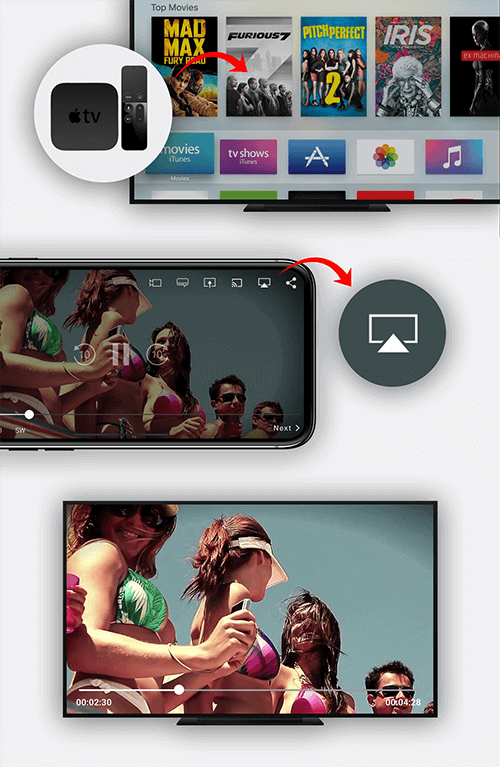
How to Airplay videos on Apple TV ?
CnX Player offers FREE AIRPLAY on AppleTV with Apple TV remote control support ! Using CnX Player Airplay feature you can easily cast your favourite videos to your TV and can enjoy the video at big screen at no extra cost !!
Follow the below steps to make video work on big screen using Apple TV device:
- Make sure you have switch on the Apple TV device and made it connect to your TV.
- You will notice Apple TV icon on top right side of player screen. Tap on that icon and select the device on to which you want to cast video.
- As soon as application gets connected to Apple TV device, splash screen will appear on application and the video will get cast on to your TV.
- You can control the playback from the application and can also do same from apple TV device remote.
Amazon Fire TV Casting
Older installed versions. The app is currently unavailable. Release updates.
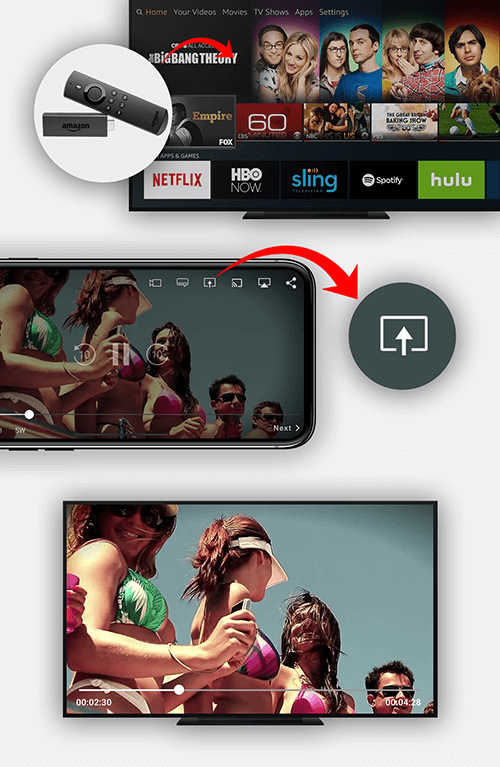
Is it possible to watch/cast video using Amazon Fire TV via iPhone/iPad ?
Yes ! CnX Player is the ONLY video player that comes with an exciting feature with which you can easily enjoy your favorite videos in your iPhone/iPad on a bigger screen like a TV by using Amazon Fire TV casting with remote control access.
Make sure you have subscribed for the Video casting feature from Navigation menu => Upgrade feature.
Follow the below steps to make video work on big screen using Amazon Fire TV device :
- Make sure you have switch on the Amazon Fire TV device and made it connect to your TV.
- You will notice Amazon Fire TV icon on top right side of player screen. Tap on that icon and select the device on to which you want to cast video.
- As soon as application gets connected to Amazon Fire TV device, splash screen will appear on application and the video will get cast on to your TV.
- You can control the playback from the application and can also do same from Amazon Fire TV device remote.
ChromeCast Casting
Older installed versions. The app is currently unavailable. Release updates.

Is it possible to watch/cast video using Google ChromeCast via iPhone/iPad ?
Yes ! CnX Player comes with an exciting feature through which you can easily enjoy your favorite videos in your iPhone/iPad on a bigger screen like a TV by using Google ChromeCast casting.
Make sure you have subscribed for the Video casting feature from Navigation menu --> Upgrade feature.
Follow the below steps to make video work on big screen using ChromeCast device:
- Make sure you have switch on the ChromeCast device and made it connect to your TV.
- You will notice ChromeCast icon on top right side of player screen. Tap on that icon and select the device on to which you want to cast video.
- As soon as application gets connected to ChromeCast device, splash screen will appear on application and the video will get cast on to your TV.
- You can control the playback from the application.
General
External subtitle
Older installed versions. The app is currently unavailable. Release updates.
How to attach external subtitles to the video ?
CnX Player support the external subtitle files. You can easily port the subtitle file from outside to the video playing screen by just copying that file into the Document Directory of the application using iTunes app.
Follow the below steps to open external subtitle into the playing video :
- On the Video playing screen click on the Subtitle Icon (top right side of player screen).
- Screen will appear in front which will contain the different options related to subtitles.
- Select the External Subtitle options from the left panel. At right panel all the subtitles will appear which are stored in the CnX Media.
- You can upload the subtitle files into the Document directory of CnX Player by following the steps of File Sharing option of Add Media section.
- Subtitle file formats supported are .sami, .smi, .srt
History
Older installed versions. The app is currently unavailable. Release updates.
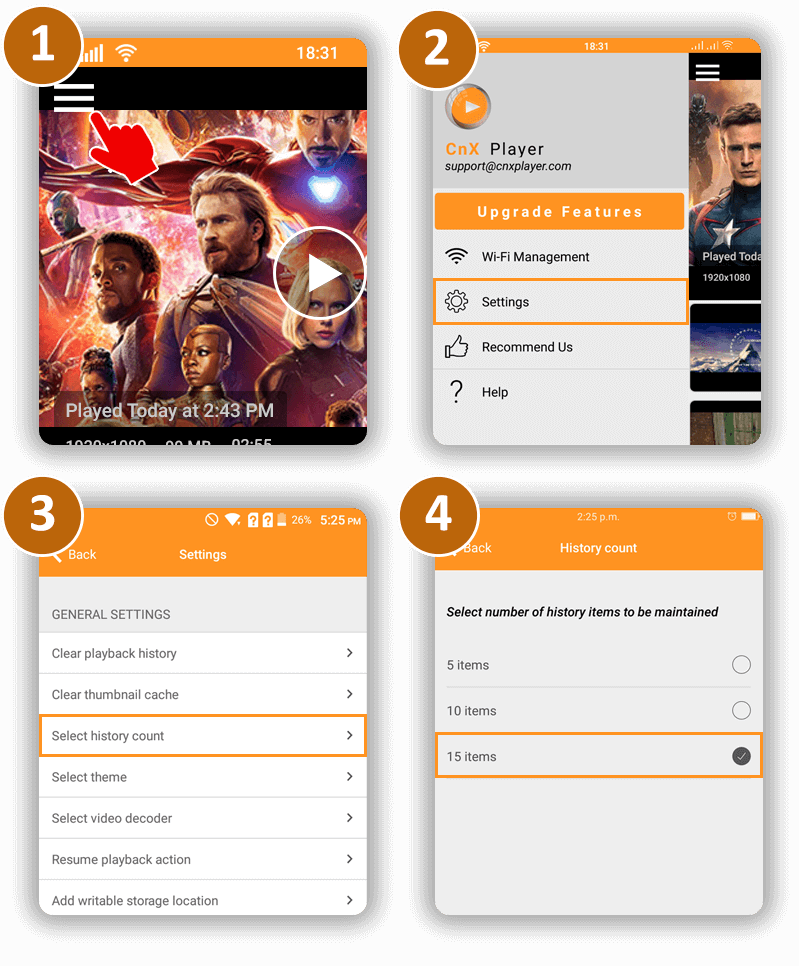
How to view and manage history of videos played ?
CnX Player home screen displays the history(time when it was played last) of videos that have been played.
Count of videos to be maintained for history can be managed as below:
- Open Navigation Bar from top left corner of home screen.
- Select Settings from the menu.
- Select History Count menu.
- Choose the number of videos you wish to maintain the history for.
You can also Clear Playback history from the Navigation Bar --> Settings -- >> Clear Playback history
How to transfer HEVC videos to iPhone,iPad
Older installed versions. The app is currently unavailable. Release updates.
Are you the one wondering why isn’t my iPhone& iPad not showing up HEVC videos?
Well, after reading this transferring or importing HEVC videos or any another video to iPhone & iPad will be just a few seconds job
HEVC (High-Efficiency Video Coding), also known as H.265, is a video compression standard that promises a 50% better compression rate with 0 quality loss. Imagine – what if a movie, that’s in absolutely stunning quality, could take up 50% less space? For example, a 10 GB file can become twice as smaller. There’s a lot to learn about HEVC video codec and how to use it in everyday life. But there’s good & bad news about it!
Good news first! it’s supported across all Apple devices running on iOS 11.
The bad news Apple doesn’t give a way to transfer HEVC videos to iOS devices ☹ Even iTunes won’t allow you to transfer HEVC& VP9 videos to the gallery! Isn’t that really disappointing? These days most of the video capturing devices (e.g. GoPro etc) prefer encoding videos in x265 (or you can say H.265 encoder) because of the obvious compression capabilities. Obviously, you WOULD NOT want to DOWN SCALE or convert HEVC into H.264 or other format and compromise on the video quality.
So, the question is How can I transfer HEVC to iPhone & iPad without converting it to another format?
CnX Player – Play & Cast video player app on iPhone & iPad gives its users a flexibility to easily transfer HEVC, VP9 and all other videos to and from iPhone, iPad.
Using CnX 4K Video Player you can now transfer videos from any OS (Windows, Linux, Android, Mac) to iPhone & iPad. Check out 3 simple ways in which you can easily transfer any video format & any video codec files to iPhone & iPad within seconds!
Quick & Easy way to import HEVC Videos into iPhone & iPad
1. Wifi Video Management –Transfer ANY video between iPhone, iPad & other devices without any wires.
2. Airdrop videos from cloud & other apps – Transfer ANY video from other apps into CnX Media Player media library and play them seamlessly.
3. File sharing via iTunes – Import ANY video from PC or other device to your iPhone & iPad via CnX Video Player
Search Videos
Older installed versions. The app is currently unavailable. Release updates.
How to search video in CnX Player?
You can search videos by name of the video.
- Click on the search button on main home screen.
- There will be a search bar on top of the screen, enter name of the video you are searching for.
- Videos matching the text entered in the search bar will appear in the list below.